To familiarize myself with the new $lookup feature of mongoDB I did some experimenting.
I tried a couple of different document structures and companion aggregation queries. I based my experiment around the idea of having orders that have keys into related items detail documents.
After seeing the results of some of the aggregations at this point (parallel arrays) I felt like either you'll have to do more manipulation with the aggregation framework to get what you are after, or you'll need to write some code. I think I'd rather just write code. Where the result set out of a SQL join seems smooth, for these types of scenarios the $lookup operator just seems clunky.
In an actual implementation I think I would prefer to see a variant of either of the last two types of documents that includes price in the document. Product prices do change. For example, sale prices, promotions, etc. Include the price in the order and you won't need to use the $lookup.
Use my code below, posted as a gist, as a jumping off point for your own experimenting.
Showing posts with label mongoDB. Show all posts
Showing posts with label mongoDB. Show all posts


mongoexport json format UTF-8 characters
So, you just did an export of your mongoDB database into a JSON formatted file called exported.json. In part, you did this because you have this crazy idea of using the JSON with another application. Then you see some strange stuff in the URL fields you exported. Specifically, you see stuff like \u0026 in them. These are actually UTF-8 codes for the % (percent) symbol. If you want to work the exported data back around to the stored format, you’ll want to check out Python’s json library. I’ve included a starting point below.
import json
f = open('exported.json')
for line in f:
    print json.loads(line),
f.close()
Tips for working with the MongoDB aggregation framework
- Review the data.
What are the data types? What is the structure? What do the values mean? - Build out the query one stage at a time.
- Start with one pipeline operation and a limit operation at the end. Review that you are getting the results you expect. Keep the limit operation in place as you add operations. Verify expected behavior every step of the way.
- Remove the limit operation as the last step .
http://docs.mongodb.org/manual/aggregation/
http://docs.mongodb.org/manual/core/aggregation-pipeline/
http://docs.mongodb.org/manual/reference/operator/aggregation/
This reference includes some nice material regarding comparison with standard SQL operations: http://docs.mongodb.org/manual/reference/sql-aggregation-comparison/
MongoDB M101P Windows 8.1 64bit Installation
This document walks you through installing the tools and libraries needed for the MongoDB M101P course available through university.mongodb.com


Choose the Python 2.7.9 X86-64 installer. Download and install it. Let it go with the default path of C:\Python27
As of this publication date, the course content is not compatible withPython 3.x. So, don’t get it!

Choose System

Choose Advanced System Settings. Then choose Environment Variables button.


Select the System Variables path as shown above. Then click edit. Append this to your system path:
;C:\Python27;C:\Python27\Scripts;C:\mongodb\bin;
Don’t miss the leading and trailing semi-colons.
Download get-pip.py I did this by, right clicking on the link and choosing, save link as
Next, open a cmd prompt. You can do this with <windows> + <r> then typing cmd <enter>
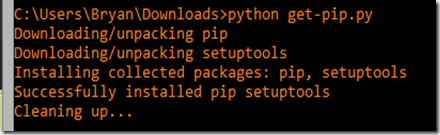
Change to the directory where you downloaded get-pip.py, most likely C:\users\yourName\Downloads, and run it:
python get-pip.py

Download and run the win-amd64 EXE and run it. The current version is pymongo-2.7.2 (pymongo-2.7.2.win-amd64-py2.7.exe). The installer will be blue background with white text and will have a title similar to the following:

After installation, run pip list to see that pymongo is installed (should be the new version).

pip install bottle==0.11.6

I recommend that you create a subfolder for every weeks course files. So, for the first week you would have C:\Projects\m101p\week1
Do not put course files in either the mongodb or python27 installation folders.
Installing MongoDB
Go to www.mongodb.org/downloads
Click on the huge green button to download MongoDB in a MSI file.
(The current version is 3.0.1)
”Unblock” the downloaded MSI by, right clicking on the file and choosing properties. Then hit the unblock button. Then hit Apply, then OK. If you don’t have this that’s okay. Continue on.


Run the downloaded MSI file – you’ll likely have to approve installation
I prefer to choose to do a custom install to C:\mongodb
After you have finished installing, you should now have C:\mongodb
With a subfolder C:\mongodb\bin
Create a folder C:\data
Create a subfolder C:\data\db
Installing Python
Go to the Python download page: www.python.org/download

Choose the Python 2.7.9 X86-64 installer. Download and install it. Let it go with the default path of C:\Python27
As of this publication date, the course content is not compatible with
Setting your path
If you want to be able to easily run the Python and MongoDB binaries from the command line you need to set your system path.
Choose System

Choose Advanced System Settings. Then choose Environment Variables button.


Select the System Variables path as shown above. Then click edit. Append this to your system path:
;C:\Python27;C:\Python27\Scripts;C:\mongodb\bin;
Don’t miss the leading and trailing semi-colons.
Installing PIP
Go to http://www.pip-installer.org/en/latest/installing.htmlDownload get-pip.py I did this by, right clicking on the link and choosing, save link as
Next, open a cmd prompt. You can do this with <windows> + <r> then typing cmd <enter>
Change to the directory where you downloaded get-pip.py, most likely C:\users\yourName\Downloads, and run it:
python get-pip.py

Installing pymongo
Visit https://pypi.python.org/pypi/pymongo/#downloads
Download and run the win-amd64 EXE and run it. The current version is pymongo-2.7.2 (pymongo-2.7.2.win-amd64-py2.7.exe). The installer will be blue background with white text and will have a title similar to the following:

After installation, run pip list to see that pymongo is installed (should be the new version).

Installing bottle
Use pip to install bottle. Note that we have to use a special option to specify the version of bottle that we want installed.pip install bottle==0.11.6

Project folder
Create yourself a project folder such as C:\Projects\m101pI recommend that you create a subfolder for every weeks course files. So, for the first week you would have C:\Projects\m101p\week1
Do not put course files in either the mongodb or python27 installation folders.
Starting MongoDB
I also suggest that you see this gist: https://gist.github.com/k0emt/10342867 as a way to start up a development mongod instance.
Stopping MongoDB
Use the mongo shell to properly shutdown mongod. Issue the following commands:
use admin
db.serverShutdown()

Subsequent to issuing the commands you will see some error messages. This is normal as the shell just lost connection with the server. You can now use <ctrl> + <d> or type the word exit to quit the shell.
Important Information for KCDC MongoDB Workshop

TL;DR
The single most important thing you need to know is that if you show up with a machine that is running Windows XP or a machine that doesn't have a JDK on it, you're gonna have a bad day.Prerequisites for your computer
OS: Windows 7 or 8, preferably 64bit, Linux or recent OS XHave a Java SDK 1.7 installed and configured with IDE on machine
Why? Because we will utilize features that were introduced in MongoDB version 2.2.
Windows XP and older versions of Linux/OS X ARE NOT SUPPORTED by MongoDB 2.2+
Prerequisites for you
Review and be familiar with JavaScript Object Notation at http://json.orgBe able to run and use the command prompt / terminal of your OS.
Be able to create code, add a jar/library, compile and run code in your favorite IDE.
Primary Goal
It is my primary goal that you leave the workshop with a functioning MongoDB environment and knowledge of the fundamentals with the skills to do routine development work.Course Outline
- Introduction and Installation of MongoDB
- Schema (Relational and Document Oriented)
- Creating, Reading, Updating and Deleting documents (CRUD)
- Advanced CRUD - sub documents, arrays, sorting, limiting and other operators
- backups
- Performance/Indexes
- Aggregation Framework
- GridFS
- Replication
- Sharding Overview
- Open Lab - Time Permitting
MongoDB Schema
One of the major aspects of MongoDB is that it is a document store. You can put anything you want into a document-- it is schema-less. However, in many cases the documents stored in a collection do consist of the same fields. So, in answer to the question, "how do I determine the schema of a collection?" There are a couple options.
- Manually/visually inspect the contents of the collection
- Use a utility to examine a single document
- Use some sort of utility to examine all of the documents in a collection
Manually inspecting the collection
As you can imagine is simply, "using" the database, and doing a db.collectionName.findOne()
For thoroughness, you'd probably want to examine more than one document. This is where a db.collectionName.find().pretty() will come in handy.
Use a utility to examine a single document
I created a small python utility given a database name and collection name will give you the keys for a document in the collection. This requires you have Python 2.7 and pymongo installed on your computer. I put this in my ~/bin directory and chmod +x it.
Use a utility to examine all of the documents in a collection
Skratch. has a cool extension to the MongoShell which examines all of the documents in a collection and tells you how many documents are using the field. Fields can vary in type by document. So, this tool even breaks down the occurrence of the field by type! It is on github at: https://github.com/skratchdot/mongodb-schema/
MongoDB examples, Replica Set and GridFS
MongoDB Replica Set with Python example
I published a short lab on working with MongoDB replica sets in Python on GitHub https://github.com/k0emt/mongodb_repset_experimentOne thing to note is that I included all of the replica set nodes in the connection information. That is because if "regular" primary node was down at the time of initial connection the code would fail.
The nodes in the replica set will figure out who should be primary and that will happen auto-magically behind the scenes. However, your client code still needs to deal with needing to reconnect.
Adjust the counters if you want to have the client up and running longer while you experiment.
MongoDB GridFS with Java example
Example code for demonstrating GridFS and the metadata field with Java was also published on GitHub https://github.com/k0emt/gridfs_example_javaBy utilizing the metadata field you can keep your document metadata with it.
Where have I been? (MSE ITS Project)
I wasn’t as prolific with my posts in 2011 and this year because I was focusing on finishing my Master Software Engineering degree and Intelligent Transportation System (ITS) project. My project website with full documentation and source can be found here: http://people.cis.ksu.edu/~bnehl/
My MSE project takes a Multiagent System approach to the Control of Traffic Signals (MACTS). In additional to control of the local intersection there will be a configuration which incorporates near neighbor coordination. The system was designed with the intent of utilizing distributed cooperating agents. The system goals include minimizing the number of stops, reducing the amount of wait time, reducing travel time, increasing the average speed of travel, reducing fuel consumption and reducing the production of hydrocarbon emissions.
The project code interfaces with the Simulation for Urban MObility (SUMO) application. MACTS was implemented with Python, RabbitMQ and MongoDB.
Getting the Enron mail database into MongoDB
Background
In order to get some experience working with Python and MongoDB I decided I would like to find a data source with a lot of free form text. This would give me experience in pulling the data into MongoDB and at a future date I’ll have a ready data source for use with learning NLTK.Finding a large dataset that met my needs turned out to be harder than expected. I came across Hilary Mason’s link page of research-quality data sets (now a dead link, see my collection which includes as much of Hilary's as we could recover.) and found the Enron email dataset. This data set contains over 500K emails. The emails are in individual files stored in a directory structure. To me, the first step in being able to use the data is to get it into a database where I could query it.
The environment
The code was developed on an Intel Core-I7 machine with 6G of RAM and a 5400RPM hard disk. This code is I/O intensive and could have benefitted from a faster hard disk or an SSD. The host OS was Ubuntu 11.04 64bit. The tools used were Python 2.7 with pymongo and MongoDB.The code
How to query
You can use the mongo shell to do some queries once you have loaded the data.“use the enron_mail” database and you can do the following:
db.messages.find({ contents : /query text/i }).limit(1).skip(0);
Besides content, the document structure also includes: mailbox, subFolder and filename.
Here are some additional links with material on the shell and how to query:
http://www.mongodb.org/display/DOCS/Overview+-+The+MongoDB+Interactive+Shell http://www.mongodb.org/display/DOCS/Tutorial http://www.mongodb.org/display/DOCS/Querying http://www.mongodb.org/display/DOCS/Advanced+Queries
Analysis
Important things to note about the code:Here are some references on unicode:
http://docs.python.org/howto/unicode.html http://stackoverflow.com/questions/4685568/importing-file-with-unknown-encoding-from-python-into-mongodb
The full run took ~21 minutes after an initial run that probably had a bunch of files in cache. The run maxed out a single core of the CPU. The process was i/o bound with the hard drive. The full 6G of RAM was in use on the machine
My query of MonogoDB says I have 517,424 emails in the document store. It shouldn’t be too difficult to modify the code to work with your database of choice.
I hope you find this code useful and that it enables you to do some analysis with this dataset.
Addendum
Brendan McAdams @rit created a version of the code which utilizes the Python email library to produce a database with more metadata. You can see the results of his work here: http://mongodb-enron-email.s3-website-us-east-1.amazonaws.com/ (now a dead link)
Subscribe to:
Posts (Atom)