Tasks, Notes and Contact Sync

So, I finally broke down and got a MacBook Pro with OS X Mountain Lion.  My personal machines to date have been Windows, Android and LINUX machines.  Because I have a myriad of platforms I have been using Google as the intermediary when it comes to sync.  Here are some notes/observations from my experience in trying to get syncing set up for tasks, notes and contacts.

Tasks

Simply put, there is no good sync for Tasks with OS X Mountain Lion.  All of the material I've found indicates that there is no way to sync Reminders with Google Tasks.  While the account set up says calendar and reminders it simply doesn't work for connecting to Google.  Just use Google Tasks via the web browser and the awesome Android gTasks application on your Android Slate/Convertible or phone.

Contacts

When I first set up the contacts sync I was only seeing 35 contacts.  I knew this wasn't correct.  After looking at the contacts section of GMail I figured out that it was only showing contacts that are tagged with "My Contacts".   After adding the "My Contacts" tag to all of my contacts they all started syncing.  However, you do lose all of your groups/tags in the contacts app on OSX.  They are not removed from GMail.

I also discovered that a new contact that had been entered on the mac wasn't syncing out to the Google contacts.  However, if I created the contact on Google contacts first it would sync out to the mac.

Notes

Notes syncs with GMail notes, not Google Docs (now Drive).  After setting up notes, I was experiencing super annoying pauses and loss of focus as the app would frequently sync with Google.  At that time I was only syncing with Google for notes.  When I turned on sync to iCloud in addition the pauses stopped.  Oh, and before you turn off syncing, make sure you have the notes associated with that account saved somewhere else.  Notes removes the notes you are no longer syncing!

After a couple days of using this set up, I made a horrifying discovery.  Every one of the syncs that was being done with Google (every few keystrokes) was creating an entirely new mail document.  I had dozens of emails which represented the progression of changes in the document!  Also, in digging into the configuration, I wasn't really syncing with iCloud for the notes either.  When I tried to turn this on through a different control panel it demands that you create an email account that will be associated with your iCloud account.  No thanks.  I am now not syncing notes either.

This article had some useful information on setting up notes sync.

Summary

I only ended up syncing Contacts when it was all said and done.  Unless you are willing to go with a single platform (Apple, Android or Microsoft) you will have sync gyrations to deal with.  Having a web based IMAP/calendar provider is a key component to making all the syncing work.

Keeping RIM Viable

It is no secret that RIM has lost its huge lead in the smart phone area.  Not only have they lost their lead, they are in danger of becoming irrelevant.  What can RIM do to not only be viable, but to become a leader again?  There are two things they can do: put Android on RIM devices and be the premier provider of sync for contacts and tasks.

Android on RIM devices

I’m sure that I’m not the first person to suggest switching from BB OS to Android.  Although, there are some details that I think are important to make this work:
  • Keep the high quality look and feel of the devices
  • Have Wi-Fi on the phone
  • Have the killer BlackBerry keyboard.
  • Have a large screen touch device with a slide out BlackBerry keyboard.
Android on the device doesn't mean having a tool or process that can be followed to port an Android app to the BBOS. It means having Android running natively on the device. For my the BlackBerry was never about the OS. The parts of the software I like are the unified settings area, the ability to change to a nice array of fonts and the security. But more important aspects were the quality feel of the device and the signature keyboard and trackball.

Sync for Contacts and Tasks

This is an area where RIM could really jump in and dominate.  With their experience with sync and BlackBerry devices and their experience with infrastructure in the secure messaging area they are uniquely positioned to be able to make this happen.  It is amazing that in present day there is still a need for a seamless way to sync contacts and tasks between devices.  What would it take for RIM to meet this need? 
Provide web applications for viewing and managing contacts and tasks.
Provide sync software for BBOS, iOS, Android, OutLook on Windows and mail/reminders on OS X.

Where have I been? (MSE ITS Project)

I wasn’t as prolific with my posts in 2011 and this year because I was focusing on finishing my Master Software Engineering degree and Intelligent Transportation System (ITS) project.  My project website with full documentation and source can be found here: http://people.cis.ksu.edu/~bnehl/

My MSE project takes a Multiagent System approach to the Control of Traffic Signals (MACTS). In additional to control of the local intersection there will be a configuration which incorporates near neighbor coordination. The system was designed with the intent of utilizing distributed cooperating agents. The system goals include minimizing the number of stops, reducing the amount of wait time, reducing travel time, increasing the average speed of travel, reducing fuel consumption and reducing the production of hydrocarbon emissions.

The project code interfaces with the Simulation for Urban MObility (SUMO) application.  MACTS was implemented with Python, RabbitMQ and MongoDB.

Git Reference

Git community book online: http://book.git-scm.com/index.html
creating:init, branch
adding and removing files::add, rm
seeing activity:log, status
basic repository operations are: push, pull, commit, checkout, clone, fetch, merge
undoing changes: reset, checkout, revert
see files in the repo:ls-files
finding stuff:grep
labeling:tag


Some git cheat sheets:
http://help.github.com/git-cheat-sheets/
http://cheat.errtheblog.com/s/git

How do I see the differences between file versions?
git diff <commit hash> <filename>

How do I go back a to version x?
Then to revert a specific file to that commit use the reset command:
git reset <commit hash> <filename>

You may need to use the --hard option if you have local modifications.
A good workflow for managaging waypoints is to use tags to cleanly mark points in your timeline. I can't quite understand your last sentence but what you may want is diverge a branch from a previous point in time. To do this, use the handy checkout command:

git checkout <commit hash>
git checkout -b <new branch name>


You can then rebase that against your mainline when you are ready to merge those changes:
git checkout <my branch>
git rebase master
git checkout master
git merge <my branch>


How do I find/look at a files history (log)?
git log <filename>
http://book.git-scm.com/3_reviewing_history_-_git_log.html

Using --stat with log will show what files changed and by how much.
git log --stat

There is also a --pretty option that provides several nicer ways of presenting the results
git log --pretty=oneline
git log --pretty=short
git log --pretty=format:'%h was %an, %ar, message: %s'


You can also use 'medium', 'full', 'fuller', 'email' or 'raw'. If those formats aren't exactly what you need, you can also create your own format with the '--pretty=format' option (see the git log docs for all the formatting options).

How do I roll back/throw away current changes?
Use checkout if you haven’t committed yet.
$ git checkout -- hello.rb
$ git checkout HEAD hello.rb

http://book.git-scm.com/4_undoing_in_git_-_reset,_checkout_and_revert.html

Use revert to fix committed mistakes.

You have to be careful when you say "rollback". If you used to have one version of a file in commit $A, and then later made two changes in two separate commits $B and $C (so what you are seeing is the third iteration of the file), and if you say "I want to roll back to the first one", do you really mean it?
If you want to get rid of the changes both the second and the third iteration, it is very simple:

$ git checkout $A file

and then you commit the result. The command asks "I want to check out the file from the state recorded by the commit $A".
On the other hand, what you meant is to get rid of the change the second iteration (i.e. commit $B) brought in, while keeping what commit $C did to the file, you would want to revert $B

$ git revert $B

Note that whoever created commit $B may not have been very disciplined and may have committed totally unrelated change in the same commit, and this revert may touch files other than file you see offending changes, so you may want to check the result carefully after doing so.

Disclaimer: I created the layout of this document, along with the questions I wanted answered for myself.  The answers are gleaned and lightly edited from results I found during the research process.  Quite a few answers were found on
stackoverflow.com

Python Coding Standard, Metrics and Test Coverage

Motivation

My motivation in seeking a coding standard, static code metrics analyzer and test coverage tool is multifaceted.  I want to know that my Python code is formatted in a way that is accepted by the community.  I want to be able to quickly check the cyclomatic complexity of code.  It is my intent to test drive my code.  Therefore, I wanted a tool which could show me and others the level of code coverage and any areas that need to be brought under test.

Note that the preferred download for all three of these tools is a .tar.gz format file.  On a Windows system you’ll need a tool like 7-zip.  All of this guidance is intended for use with Python 2.7 and PyCharm 1.5.4.  You need to add C:\Python27\ to your PATH environment variable in order to successfully install these tools.

PEP8

PEP8 is a tool that provides guidance that you are following proper Python coding formatting.  Download from here: http://pypi.python.org/pypi/pep8

Extract the PEP8 folder.  Using a command prompt change to the extracted PEP8 folder directory.  Run: python setup.py install There should now be a pep8.exe and pep8-script.py in your python installations scripts directory.  You can now delete the extracted PEP8 folder.

PEP8 with PyCharm

From http://www.in-nomine.org/2010/12/14/pycharm-and-external-lint-tools/

PyCharm already has a number of features present in various tools to lint/check your source code with, but offers a way to hook up external tools. Under File > Settings is a section called IDE Settings. One of the headings here is called External Tools. Select this heading and then press the Add... button on the right hand pane to configure a new external tool.

In the Edit Tool window that now appeared fill in a name, e.g. PEP8 and a group name Lint and add a description. Next point the Program to the location of the pep8.exe executable, e.g. C:\Python27\Scripts\pep8.exe. ForParameters you need to use $FilePath$ and Working directory should be same as the Python scripts directory. Once done, you can close it by pressing the OK button.

Now add a filter to the external tool to get click-and-go-to behavior

image

See http://www.jetbrains.com/pycharm/webhelp/add-filter-dialog.html for how to add filters.

use this for the spec: $FILE_PATH$:$LINE$:$COLUMN$:.*
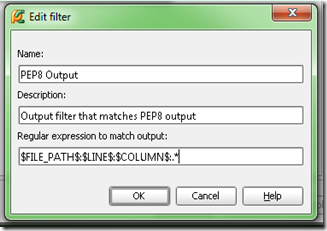
image

Select a file either in the navigator or editor panes.

Then from menu can go to Tools > Lint > PEP8

You'll also have links you can click on for the PEP8 output.

Following my initial installation notes on a second machine I was getting a urllib.parse error from PEP8.exe, "no module named parse" Seemed like this problem is related to distribute. Pulled down the latest from http://pypi.python.org/pypi/distribute Nope, wouldn't install. Looking like issue with C:\python27\lib\urllib2.py.  Web pointed me to reinstall setuptools http://pypi.python.org/pypi/setuptools  Installed that… tried to install distribute again… still no go… X|  Ended up doing a python setup.py install to get distribute installed.  Now, PEP8 works!

PyMetrics

PyMetrics is a tool for doing static code analysis.  Download it here: https://github.com/ipmb/PyMetrics/downloads There is a tar.gz on SourceForge. However, the pymetrics runner does not have the .py extension which causes problems with extraction on a Windows System.

Extract your downloaded file.  Change to that directory and run python setup.py install  You can now delete the extracted folder.  Now if you look in your Python scripts directory you'll find a pymetrics.py

Set up as an external tool in PyCharm as with PEP8.

image

The --nosql and --nocsv options tell the tool to not generate associated SQL insert code and suppresses the generation of a related CSV file.

Sample output from DarkMatterLogger.py

An earlier version of the DarkMatterLogger.py that was analyzed can be found here: https://gist.github.com/1218497

C:\Python27\python.exe C:\Python27\Scripts\pymetrics C:\macts\source\spikes\DarkMatterLogger.py
=== File: C:\macts\source\spikes\DarkMatterLogger.py ===
Module C:\macts\source\spikes\DarkMatterLogger.py is missing a module doc string. Detected at line 1

Basic Metrics for module C:\macts\source\spikes\DarkMatterLogger.py
--------------------------------------------------------------
          4    maxBlockDepth
         12    numBlocks
       3726    numCharacters
          2    numClasses
         15    numComments
          5    numFunctions
         24    numKeywords
        104    numLines
        668    numTokens

         14.42 %Comments

Functions DocString present(+) or missing(-)
--------------------------------------------
- DarkMatterLogger.__init__
- DarkMatterLogger.sendMessage
- DarkMatterViewer.__init__
- DarkMatterViewer.__init__.msg_consumer
- main

Classes DocString present(+) or missing(-)
------------------------------------------

- DarkMatterLogger
- DarkMatterViewer

McCabe Complexity Metric for file C:\macts\source\spikes\DarkMatterLogger.py
--------------------------------------------------------------
          1    DarkMatterLogger.__init__
          1    DarkMatterLogger.sendMessage
          1    DarkMatterViewer.__init__
          2    DarkMatterViewer.__init__.msg_consumer
          1    __main__
          4    main

COCOMO 2's SLOC Metric for C:\macts\source\spikes\DarkMatterLogger.py
--------------------------------------------------------------
         55    C:\macts\source\spikes\DarkMatterLogger.py
*** Processed 1 module in run ***

Process finished with exit code 0

Coverage.py

Coverage.py is a tool for doing code coverage analysis.  Download it here: http://pypi.python.org/pypi/coverage  If you have a 64bit installation you’ll want to make sure you use the .tar.gz and not succumb to using a prepackaged exe.

Downloaded the coverage-3.5.1.tar.gz version.  Extract folder from gzipped tar file.  Chang to directory of download and: python setup.py install  Now if look in c:\python27\lib\site-packages will see coverage-3.5.1-py2.7.egg Look in the scripts dir and a coverage.exe and coverage-script.py will be seen.

Gather metrics on your code with: coverage run class.py

Then get the report with: coverage report -m

The -m says show the line #s of statements that were not executed.  Use coverage erase to get rid of previously run data.  During my experimenting every run would get rid of previous data. 

Set up as an external tool in PyCharm like other tools.  Except had to do one for the run and another for the report.  Others are integrating into their environment using nose.

Name: Coverage

For program: C:\Python27\Scripts\coverage.exe

For parameters: run $FileName$

Working directory: $FileDir$

Name: Coverage Report

For program: C:\Python27\Scripts\coverage.exe

For parameters: report -m

Working directory: $FileDir$

Coverage Sample Output

C:\Python27\Scripts\coverage.exe run C:\macts\source\spikes\ArgumentsTests.py
...........
----------------------------------------------------------------------
Ran 11 tests in 0.004s

OK

Process finished with exit code 0

Coverage Report Sample Output

C:\Python27\Scripts\coverage.exe report -m
Name             Stmts   Miss  Cover   Missing
----------------------------------------------
arguments           33      0   100%  
argumentstests      45      0   100%  
----------------------------------------------
TOTAL               78      0   100%  

Process finished with exit code 0

Summary

By integrating these three tools into your development process you’ll increase the community acceptance of the code you produce as well as increase the quality of the code you produce.

Getting the Enron mail database into MongoDB

Background

In order to get some experience working with Python and MongoDB I decided I would like to find a data source with a lot of free form text. This would give me experience in pulling the data into MongoDB and at a future date I’ll have a ready data source for use with learning NLTK.
Finding a large dataset that met my needs turned out to be harder than expected. I came across Hilary Mason’s link page of research-quality data sets (now a dead link, see my collection which includes as much of Hilary's as we could recover.) and found the Enron email dataset. This data set contains over 500K emails. The emails are in individual files stored in a directory structure. To me, the first step in being able to use the data is to get it into a database where I could query it.

The environment

The code was developed on an Intel Core-I7 machine with 6G of RAM and a 5400RPM hard disk. This code is I/O intensive and could have benefitted from a faster hard disk or an SSD. The host OS was Ubuntu 11.04 64bit. The tools used were Python 2.7 with pymongo and MongoDB.

The code


How to query

You can use the mongo shell to do some queries once you have loaded the data.
“use the enron_mail” database and you can do the following:
db.messages.find({ contents : /query text/i }).limit(1).skip(0);
Besides content, the document structure also includes: mailbox, subFolder and filename.
Here are some additional links with material on the shell and how to query:
http://www.mongodb.org/display/DOCS/Overview+-+The+MongoDB+Interactive+Shell http://www.mongodb.org/display/DOCS/Tutorial http://www.mongodb.org/display/DOCS/Querying http://www.mongodb.org/display/DOCS/Advanced+Queries

Analysis

Important things to note about the code:


  • change the MAIL_DIR_PATH variable to match your installation.

  • getFileContents decodes the text as being in cp1252 character set

  • saveToDatabase encodes the text in utf-8 for mongo compatibility

  • The os.walk method is key to the simplicity of this code


  • Here are some references on unicode:
    http://docs.python.org/howto/unicode.html http://stackoverflow.com/questions/4685568/importing-file-with-unknown-encoding-from-python-into-mongodb
    The full run took ~21 minutes after an initial run that probably had a bunch of files in cache. The run maxed out a single core of the CPU. The process was i/o bound with the hard drive. The full 6G of RAM was in use on the machine
    My query of MonogoDB says I have 517,424 emails in the document store. It shouldn’t be too difficult to modify the code to work with your database of choice.
    I hope you find this code useful and that it enables you to do some analysis with this dataset.

    Addendum

    Brendan McAdams @rit created a version of the code which utilizes the Python email library to produce a database with more metadata.  You can see the results of his work here: http://mongodb-enron-email.s3-website-us-east-1.amazonaws.com/ (now a dead link)

    Work when others are not

    I read an interesting blog post from the Time Management Ninja where he talks about getting things done at the office during the last week of the year.

    However, it wasn’t quite what I expected when I had seen the title (same as this blog post).  For me, working when others are not is typically about quiet time at home or on the road working on personal or academic pursuits.  To get this quiet time I typically “work when others are not” by getting up earlier than the rest of the house or staying up later.

    While you can stay up later to work on things, I have found that past a certain time it just doesn’t matter.  The mind fogs and the body starts forcing shutdown routines to run!

    The approach that requires more discipline but I find is ultimately the better choice is to go to bed earlier and get up earlier.  You awake refreshed, with clear head and a quiet house.  Here are some tips to help you get that time in the morning:

    • Figure out how many hours of sleep you need and how many hours you want for yourself before you have to leave for work or school in the morning.  Set your go to bed time accordingly.
    • Set an alarmed reminder for 30 minutes before your go to bed time.  Start your shutdown routine.
    • Use the alarm on your phone as your alarm clock and have it set to the minimum volume necessary.  Set it up to not beep through the night for email or social network alerts.
    • Shower the night before (but not at the last minute which wakes you back up)
    • Lay out your clothes the night before.  You may need to get dressed in the bathroom or other location so you don’t wake up others in the house.
    • Have your workspace ready to go.  Leave yourself a note of what you are going to work on.  Have a bottle of water and perhaps a light snack there too.
    • Pack your lunch the night before.
    • If you are going to check email or your favorite sites, set a timer so you don’t blow all your quiet time on that.

    I hope you find this information useful and are able to enjoy a more calm morning and enjoy some more sunrises!

    Traffic Flow Simulator

    Overview demo

    This video is a demonstration of simulating traffic flow within and between intersections/local networks using a tcp/ip server and multiple clients. The clients have factories that either create cars or receive them from the server. The client then simulates the traffic flow until the cars arrive at a "sink" or graph exit. The sink may be a normal sink or a network sink. For a normal sink, the vehicles are simply removed from the graph. If it is a network sink the car data is sent on to the server.

    http://www.youtube.com/watch?v=f1qgI55ULIY

    RNS Basics

    Helpers includes a few utility or helper classes. For instance an easy way to get the local machine name and a StopWatch class.

    Demos are examples that demonstrate the basic serial and threaded worlds as well as the distributed clients. The Repeater class in the distributed package has a main() which works as the server.

    The Render package has a text render which is used to output information about the network structure and the location of vehicles on the network.

    http://www.youtube.com/watch?v=1ndETp0ALHA

    RNS Basics Part 2

    In this video I will review, links, connectors, vehicle factories and Cars.

    Links can be thought of as stretches of road. There was some initial code put in place for using coordinates to describe the link geometry. Links are the logical area where you will find cars. Sinks and factories are also special types of links. Sinks destroy cars and factories create them.

    Connectors can be thought of as intersections. They have entry and exit links. Imagine that you are driving in your car approaching an intersection. You are on an entry link to that connector. When you pass through the intersection to a connecting you road, you have driven onto an exit link.

    A Vehicle Factory is used to bring cars onto the local graph.

    Cars carry a globally unique identifier.

    http://www.youtube.com/watch?v=mlTNdqSToTo

    The World

    The World Factory is used to create worlds. It can create serial or threaded worlds. It can be used to create several different road structures.

    http://www.youtube.com/watch?v=jmsyjkdxIVg

    The Server

    The Repeater accepts client connections. It repeats the data from them to all other connected nodes along with the identity of the originating node. If it detects that a node has dropped it removes it from it's client list.

    http://www.youtube.com/watch?v=ktHGs-DpgeA

    Basics of a client node

    A Distributed Client uses the DistributedWorldFactory to create an instance of a DistributedWorld. The DistributedWorld is very similar to the normal distributed world. However, it includes distributed links and the distributed vehicle factory. The world handles the connection with the server. When processing vehicles that are in sinks as part of the update method, outgoing vehicle is sent to the repeater/server if is a distributed link (sink). The world also receives the incoming repeated car data from the repeater. The world passes the data on to all listening factories. The distributed factory determines if it needs the information. If it does, it places it in an incoming queue. Then when the world asks for a shipment from the factory, the factory sends the information about the cars that are in the queue. Even while the world is adding new information to the queue!

    http://www.youtube.com/watch?v=Cc1nYuTujZY

    Network and Node configurations

    Network and Node configuration diagram

    Node A configuration

    This node starts with a normal factory. It is connected to a link which is in turn connected to a network sink. The network sink relays information to the repeater.

    Node B configuration

    This node has a distributed factory which is listening for car data that originates from Node A. It is connected to a link which is in turn connected to a network sink. The network sink relays information to the repeater.

    Node C configuration

    This node has a distributed factory which is listening for car data that originates from Node B. It is connected to a link which is in turn connected to a normal sink. The normal sink simply removes the cars from the local graph.

    Files

    You can get a JAR with the code here http://dbbear.com/TrafficFlowSimulator.jar

    Sample output, which corresponds to the video run can be obtained here:

    Conclusions

    A developer using this code structure will need to be careful to not have multiple distributed factories that pull from the same network sink. If this were to happen we'd have cloned cars in the overall network.

    Association of vehicles with graph objects seems awkward. In a system that is highly focused on traffic a system that uses GIS type concepts would likely be better.

    While this code may not be ideal for true traffic simulation because of the way vehicles are associated with individual graph elements, it does a good job of demonstrating threading and client-server based communication.

    Transforming from serial to threaded

    Background

    As part of an experimenting project I am transforming code that I initially wrote for simulating traffic on a road network into a threaded version.

    Initial Threading

    Initial threading of the removing of cars in sinks (road network exits) yielded a longer run time for the threaded version. Most likely the issue is the limited number of vehicles and only two sinks.

    With this aspect of the project I worked with java.util.concurrent Executors and pooled task execution using maximum/free pool size, a fixed pool size and a pool handled by a single thread.

    Using implements Runnable simulation runs: 5 Simulated run time: 600 seconds

    Serial time: 0.29

    Serial time: 0.222

    Serial time: 0.202

    Serial time: 0.205

    Serial time: 0.2

    Threaded time: 1.866

    Threaded time: 1.275

    Threaded time: 1.202

    Threaded time: 1.273

    Threaded time: 1.122

    Changed up some data structures ConcurrentHashMap and tweaked the code in terms of variable scope. 

    Using fixed thread pool size of 2 Following result:

    Serial time: 0.276

    Serial time: 0.199

    Serial time: 0.16

    Serial time: 0.161

    Serial time: 0.162

    Threaded time: 1.335

    Threaded time: 0.914

    Threaded time: 0.846

    Threaded time: 0.837

    Threaded time: 0.876

    A thread pool size = 2 performs about the same or slightly better than a threadpool size = 1

    A thread pool size of > 2 yields worse results than equal to 2. 

    So overall, this result is somewhat disappointing.  After some discussion with my advising professor I set about profiling the code.

    Setup Profiling

    After some initial research, I decided to give the TPTP project a try.  Primarily since it is part of the overall Eclipse program and installs into the environment.

    TPTP Page

    http://www.eclipse.org/tptp/index.php

    How to install from within Eclipse

    http://wiki.eclipse.org/Install_TPTP_with_Update_Manager

    How to setup your project

    http://www.eclipse.org/tptp/monitoring/documents/tutorials/tptp_btm_setup_4.3.html

     
    After doing the install, I was able to open Eclipse to my project and choose Profile As.  This in turn put me into the profile creator, where I chose to profile the threading.  I was also prompted to switch to the profiling perspective.  Click the checkbox to not be prompted every time to switch perspectives.

    If there is a lot of information for the profiler to process it will consume quite a bit of CPU and leave Eclipse unresponsive while it is processing.  For my project five simulation runs for 60 seconds would leave you with an unresponsive environment and the need to kill the application.  Understand, that since this project is an exercise in threading that there are many threads and pools.  A single 60 second simulation run yields 2400 pools with several threads each.

    Profiling

    The initial thread statistics, blocked time/count and deadlocked time/count show the trouble spots.clip_image001

    Under Monitor statistics, you can drill down further.  Now I have a really good idea of what code needs further inspection.clip_image002

    Switch to Threads Visualizer

    clip_image003

    The blue line corresponds to time in the application.  I had to zoom the time scale to make the trouble area visible.

    Red indicates deadlocked, yellow indicates blocked.  By looking at the call stack we can determine the problem area.

    Run times for this sample: Simulating 60 seconds Threaded time: 0.048 Serial time: 0.0030

    I wanted to try out CyclicBarriers and explicit use of Threads with .start() and .join()  to see if there were any significant differences from the pooled task approach.  The biggest issue for me with both of these approaches is that you need to keep explicit track of either the number of threads or keep a reference to the thread so you can issue the join().  I did notice that the Thread approach seemed to leave Threads running.  Wondering if I needed another join().

    Ultimately I settled on a hybrid of serial code and java.util.concurrent Executors.  Timing numerous runs also indicated that at least for my application Executors where going to be the right approach.  Especially since the type and size of the thread pool is configurable.

    Post Profile

    After copious time spent using the profiler to analyze and adjust the threaded code I now have the following results:

    Serial time: 0.23

    Serial time: 0.143

    Serial time: 0.114

    Serial time: 0.099

    Serial time: 0.11

    Threaded time: 1.383

    Threaded time: 0.889

    Threaded time: 0.843

    Threaded time: 0.831

    Threaded time: 0.785

    Note that the serial times have dropped.  This is a byproduct of a shared base class that was tweaked along the way.  In order to fairly evaluate serial versus threaded code it is important that the serial code be optimized.

    The threaded times are about the same as before.  However, the big difference is that the profiler is now indicating no deadlocks and minimal blocking.  To achieve this I changed some data types and adjusted the thread pools used by each method.  Now three of the five methods are using newCachedThreadPool which creates as many threads as needed/possible.  removeVehiclesInSinks() is now use a newSingleThreadExecutor and I switched to serialUpdateFactories because I was running into blocking/deadlock problems.

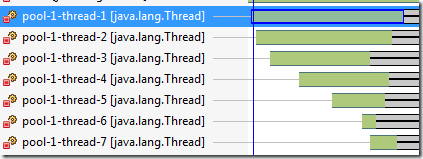
    Nice visual of thread pool execution:

    clip_image001

    Note the lag between the creation of thread pools versus execution times:

    clip_image002

    Busy

    I still wasn’t happy with the serial code being faster than the threaded code.  However, no I knew from looking at the profiled code that threading overhead was significant for the “toy” problem.  So, I thought, what if the methods took longer to run?  In a prior exploration with C# Task parallel computing I had created a “busy” method.  To accomplish the same sort of effect I added in a Thread.sleep(1) to the VehicleLocationCollection::update().  That's a sleep 1ms in an often used method.

    Here's the result:


    Simulation runs: 5 Simulated run time: 60

    Serial time: 4.811

    Serial time: 4.818

    Serial time: 4.818

    Serial time: 4.796

    Serial time: 4.807

    Threaded time: 2.625

    Threaded time: 2.518

    Threaded time: 2.523

    Threaded time: 2.49

    Threaded time: 2.509


    Simulation runs: 5 Simulated run time: 600

    Serial time: 58.564

    Serial time: 59.062

    Serial time: 58.865

    Serial time: 59.021

    Serial time: 59.399

    Threaded time: 30.445

    Threaded time: 30.108

    Threaded time: 30.084

    Threaded time: 31.013

    Threaded time: 37.486

    I'm glad I thought to make one of the more often used methods more intensive.  To me, this shows that there is indeed an improvement over the serial version when the application crosses a threshold of compute intensity/time versus threading overhead.

    Summary

    When comparing serial versus parallel code they should both be optimized.  I started with a working serial implementation and transformed it into a threaded version.  Both versions inherit from a common base class.  Unit tests help verify expected behavior.  When transforming to threaded code I found myself using a top down approach.  Methods which iterate over a collection are an easy target for extracting the interior loop body into a method to run as a task.  Transformation of related data structures to thread safe data types is essential.  Try to minimize or eliminate the need for locking/synchronized code.  Too much locking and you just created threaded code which runs in a sequential manner at best.

    The TPTP project profiling tool is very useful for profiling threaded applications.  You can quickly identify code that is deadlocked, blocked or waiting.  Your efforts can then be focused appropriately.

    Threading is only beneficial once you have enough work to pay the overhead penalty.  Sometimes you are better off using the serial implementation.  ForkJoinTasks take that approach, they fork the problem until it is small enough to process efficiently in a serial way.  The Executors class gives the developer a lot of flexibility in fine tuning the type of thread pool: unlimited, fixed or single.

    Good luck in your threading endeavors!

    The Big Yes, Focus and Squirrels

    Lately, the notions of "having a bigger yes that permits you to say to no to other things" and "focused intensity" have been on my mind.

    The Bigger Yes

    The basic idea here is that you have some compelling big thing that you are saying yes to in your life.  This permits you to say no to other things.  An example would be that students will choose to say no to some activities because they are saying yes to their education.

    Focused Intensity

    There is the notion of living a life in balance.  There is another of focused intensity.  Mastery and the exceptional are more often associated with focused intensity than balance in all things.

    I was doing some research on focused intensity and came across this blog post:

    http://mistakemaker.com/2009/11/23/momentum-lessons-from-a-spray-bottle-and-a-4-year-old/  With an interesting formula/idea from Dave Ramsey.  And in a round about way led me here: http://lci.typepad.com/leaders_resourcing_leader/2010/01/my-entry-2.html

    I took/thought about the formula in the first and noted that dividing by time (over time) was totally incorrect.  The last post is better.  However, it still seemed a bit off to me.  So, I revised the equation as a summation and added a target set of goals for focused intensity.  I don't think the result is momentum.  To me the result would be the achievement of a goal. 

    The Squirrel Diverter

    Once upon a time I read about an idea to create a specific to you web page and set that as your start page.  The basic notion is to  redirect yourself away from the squirrel that had grabbed your attention.  Here is Merlin Mann's page: http://www.merlinmann.com/rightnow/

    With out too much effort you can create your own default web page.  If you host it on your website and use Chrome with Google Sync it can be your default page everywhere!  Or simply save it as an HTML file on your machine and default to it.

    The Result

    So, thinking about the focused intensity formula, my big yes and the squirrel diverter, I created my own default page.  I used html so that I could list the most important goals and easily update them.  The end result can be seen here:

    http://dbbear.com/focus.html

    I would encourage you to think about your big YES and create your own focus intensifying start page.

    UPCRC Multi-core programming school @ UIUC

    One line summary: The UPCRC multi-core programming school was very intense in a good way.

    The Material

    We eased into things with a basic intro to parallel computing Monday afternoon. Tuesday-Thursday were all very fast paced. We had lecture from 0845-Noon and then again from 1PM to 2PM. At 2PM they would do an overview and introduction of practical labs that corresponded to the days lecture materials.

    There were always more labs to choose from than you could complete in a day. So, it was up to the student to pick the labs which they thought would be most beneficial to them. We had lab time between 2:30PM and 5:30PM. During this lab time the lecturers from the day were available. We had a forced :) supper break from 5:30PM-6:15PM. The lab and lecture area were locked up during this time. The lab reopened at 6:15PM and closed at 10:00PM. During this time frame knowledgeable GTA/GRAs were available to answer questions.

    I was already somewhat familiar with Java explicit threading so there weren't any surprises there.

    OpenMP was probably the easiest to work with and use. It uses pragmas with C++. Visual Studio 2010 has out of the box support for OpenMP.

    Intel TBB took some work, but it is more powerful/flexible than OpenMP.

    .Net Parallel LINQ (PLINQ) and the Task Parallel Library (TPL) were interesting. It was interesting to work to apply lessons from here in a previous .Net project that does everything in a serial way. It reminded me that we need to make special considerations when ordering is important. Also, you really need to know and understand lambda expressions.

    The OpenCL material was by far the hardest. It was difficult in terms of the steps to set up the code and in debugging/figuring out what was going wrong. I was able to complete a Matrix Multiply lab. However, it took about 5 hours. From what I gather only one or two other people completed that lab.

    We had a two hour lecture on Thursday regarding vectorizing code. It was very intense and very interesting. I feel like the professor probably covered two weeks of graduate material in those two hours! It was helpful to learn about dependences and how loops could be unrolled or how loops could be changed to allow the compiler to do more optimizing. I need to review the slides and notes from this lecture.  As I recall we covered 48 slides in each of the one hour sessions.

    My overall impression is that it is much easier to work with multi-core CPUs than GPUs. The other I noted that there seems to be more focus/maturity in C/C++ support. I'm sure that will change as the SDKs mature.

    We wrapped up Friday with a look at an Intel analysis tool and overview of what had been covered and what had not been covered.

    Blue Waters

    Friday before lunch we toured the future home of the IBM Blue Waters/NCSA facility. It is simply huge. They had what appeared to be many servers in place, but they were actually the power distribution centers! The first floor of the building is all mechanical infrastructure. The building is also set up to be secure facility with swipe cards, PIN entry, retinal scanning and even a "bell" that you are locked in and weighed in.

    Summer School Environment

    The building facilities, labs, lecture room (power on top of the table at all spots), meals and snacks were all excellent.  The building architecture itself was interesting.  There were many areas inside and outside of the building where you could sit and work.  They also had areas on every floor with seating and whiteboards.

    People

    Instructors were enthusiastic about the material and were open to questions. It was great that they helped in the labs and were available for questions that were related to the material yet unrelated to the labs. If you had a question about how something they covered might relate to your research they were interested in talking with you and discussing it.

    Assistants were knowledgeable and helpful with the lab environment and the labs too.

    Staff kept everything running smooth and on time.  They also managed to arrange for good meals and snacks.

    The school was also an awesome opportunity to talk with other students from around the world that are interested in this aspect of programming. It was neat to hear the varied application areas that were being considered.

    Summary

    Overall, a great experience.

    http://www.upcrc.illinois.edu/summer/2010/program.html

    Something I may consider for next year is another school that they offer:

    http://www.vscse.org/summerschool/2010/manycore.html

    Data Parallel Computing

    Data Decomposition Parallel computing works by using a shared data object with multiple “processors” working on it. image

    the toy problem

    To learn more about Data Decomposition type parallel computing I created a toy application. This entailed creating a demo application that utilized a basic stopwatch instrument, a serial computing class and a parallel computing class.  The application will perform row or column based operations on an 8K by 8K array.

    Since I needed to time runs I created a basic stopwatch class. This class provides for starting the stop watch, checking elapsed time and stopping it.

    the serial code

    I created a serial computing class that initializes an 8K by 8K array of integers and has methods for computing across rows and computing down columns. I created these two methods so that I could see potential differences in working with the array via row or column.

    The serial class is used as the baseline which the parallel class is compared against.

    I wanted to make sure that the results from the serial and parallel calculations were the same. Therefore, I added methods to the serial class that can be used to check that the parallel results match.

    the parallel code

    Because the implementation language was Java, the parallel code class extends the Thread class. The Thread class works by using a run() method that takes no arguments. To cope with this, I use a private constructor to determine which method to run. The parallel methods create a new instance which takes arguments for if the row or column method should be called and the start and end value of the domain. These arguments set internal variables which are then used within the run() method.

    Psuedo-code for the parallel computation:

    computeRowsDomainLimited(int startRow, int endRow)

    {

    Partsize = size / # threads

    Remainder = size % # threads


    For o = 0 to < # threads

    {

    Start = o * size

    End = start + partSize

    computeRowsDomain(start,end)

    }

    computeRowsDomain(end, end+remainder)


    Set up threads with the above

    Then run them

    Then join/wait for all to finish

    }

    Results

    The development machine was a powered by an Intel I7-720 with 6Gig of RAM.  The baseline serial methods and the parallel methods of varying partition/thread size were each run 10 times.  The best run time is used in the calculations.

    image

    image

    The code seems to scale well and perform well for the row based computation up to 8 processing threads. Then it seems to drop off a bit and then gradually taper off in performance. I think this corresponds to the machine having 8 logical cores. After 8 the overhead of the additional threads is greater than any potential benefit.

    However, the performance the columns seems to peak out around 4 or 5 threads. This could be because of the CPU having 4 real cores with Hyper-Threading. Or it may be that the overhead of accessing non-continuous memory is the determining factor.

    Source Code

    Source code for the demo application that utilizes the stopwatch class and both the serial and parallel computing classes can be found here:

    http://www.dbBear.com/DataDecomposition.zip

    In the future I will implement the same computations using OpenCL.

    Shim it!

    The lock on my front door was tough to turn.  I was afraid to turn the key too hard for fear of snapping it off.  I figured out that if I lifted the handle up that allowed the bolt to properly seat.  I noticed where the bolt was rubbing against the striker plate and the cut out in the door frame.  I bored out the opening in the wood slightly.  Minimal improvement, but still not satisfactory.  I tried moving the striker plate.  I didn’t want to force it too much since the screw holes would have to be filled and re-drilled for any major adjustment.  I even tried moving the locking mechanism to alter the angle of entry into the striker plate.  I did notice that the whole door seemed like it was a bit out of square with the frame.

    Then it occurred to me to place a shim under one of the hinges on the door to adjust the whole door.  This worked!  The whole door is now square in the frame and it has a better seal with the gasket.  No daylight.

    Software

    Have you been tweaking, altering and adjusting parts of your system when a shim could be place in the right place and make the whole system work properly?  Perhaps, a strategically used adapter pattern would make the whole application easier to code?  Maybe some small tweak in the UI could lead to a more enjoyable experience through out the whole system?

    Hot on the edges, raw in the middle

    Use the microwave at 100% to cook or reheat and you can end up with something that is hot on the edges or the outside, yet raw in the middle.

    However, if you utilize the manual settings, like 60% power level with more time you will find that the food is more evenly cooked.  Or better yet, consult the manual and use the correct settings for the food type and quantity.

    In the software development processes, breathing time/thinking time is good.

    100% full bore gets you done.  However, when you have time to think about the system you may experience remorse.  To extend the microwave analogy--perhaps,  you have a nice shiny UI but rotten messy code under the hood.  With an appropriate “cooking temperature” you’d have both a nice UI and good code under the hood.

    Task Parallel Computing

    There are two primary parallel computing techniques: task parallel and data parallel.  Some key aspects to consider if tasks can be run in parallel:
    • Are there dependencies between tasks?
    • Does the result of the operations change if you change the execution order?
    • Will there be contention for data or some other resource?
    • Will we get a return on investment for the overhead of configuring and running in parallel?
    • Do we have a significant number of tasks to run?  We should have more tasks to run than we have cores.

    Batch processing

    I created a BatchProcessor solution with a console application called BPRun.  This project runs a setup portion, the parallel tasks and then the teardown jobs.   The tasks to run are specified in corresponding configuration files.  I use code similar to this in production for batch processing ~20 DOS .bat jobs.  Being able to have jobs run in a parallel fashion has resulted in a significant time savings.

    Setup and Teardown

    The setup and teardown portions of the application are run in a serial fashion.  The items in the configuration files are executed one after another.  Comments may be placed in the file with // prefixing.

    Task Parallel

    The task parallel section executes the items in the corresponding configuration file.  As a task finishes the scheduler picks up and runs the next job on that process.  The code that does this is in a corresponding Processor class.

    Tasks with dependencies

    What if you have a task that has a dependency?  You can chain them.  That is, have the first process or task call the second or dependent task upon completion.  For instance, you may have a job that does some data prep and then chain it to call a task that does analysis.

    Keeping Busy

    On *nix systems we have the sleep command which we can use to pause for the given # of seconds.  However, this doesn’t place any load on the machine.  I wanted the machine to have a load placed on it by the tasks so that we could see that it is really taxing the machine.  To that end I created a small console application called Busy.  This takes the number of seconds to be busy as a parameter.

    Download

    You can get the source code for the Batch Processor and the Busy application here: https://github.com/k0emt/BatchProcessor

    Video

    See a video tour of the code for Busy and the Batch Processor along with demos of the applications here:

    Programmer Productivity Tools

    I’ve been reading Neal Ford’s The Productive Programmer.  It’s a good read so far.  I’ve picked up a few tools that have already been helping.  Pick up the book for the details on the reasoning behind having/using these utilities.

    Virtual Desktop Manager VirtuaWin this lets you have multiple virtual desktops.  I’m using one for communication apps, one for development, one for research and one for miscellaneous stuff.

    Clipboard Manager Tool Ditto.  So far, I’m not very fond of the UI but I like the way it works.  Let’s you work with a clip board stack across all of your apps.  I used it to clip all of the URLs for this article and then paste them in appropriately.

    Clipboard Manager that is a Windows Gadget.  Lots of background choices.  It’s a Windows Gadget so it’s always visible.  However, I’m not liking the way it works.  I’ll probably drop it.  Just thought I’d give it a whirl and thought gadget lovers might go for it.

    Cygwin for bash, *nix-ish utilities, vim, Emacs, wget, curl, etc.  Keep around the downloaded executable.  It’s really a loader and not an installer per se.  You’ll also have a download folder that accompanies the loader.  So, you may want to pre-plan where you’re going to keep that before you run the loader.

    Clean code motivates

    sweaty_hat I’m still dripping as I’m writing this.  (Okay, maybe not now, but when I did the voice memo recording I was!)  I’m just feeling very inspired and want to get this down in bits.

    A lot of people talk about code smell, what it is, how to detect it and anti-patterns.  However, the thing that struck me today was this:  I was out mowing the yard.  The temperature was like a billion degrees, it was humid and I was mowing uphill no matter which way I turned!  So basically, it was hard work.  The thing that struck me was that I hit a section of air that smelled like a fragrant fabric softener.  It really perked me up.  I felt rejuvenated and mowed with more gusto.  I looked forward to returning to the portion of the yard that had the scent in the air.

    The crossover

    That got me thinking about code smell.  Besides code taking us more time to work through because of quality issues, there is also the issue that it smells!  It is repulsive, it is repugnant, it is de-motivating!  Who wants to go work on the smelly code?  No one wants to do it.  It is like being told to retrieve a book that is in a library that is located in the middle of a landfill.  No one wants to do that.  I think there is a psychological aspect of smelly code that should be considered.  That is, people want to stay away from stinky code.

    On the flip side, are you excited when you get to go work in clean code?  Code that is well factored, code that uses patterns, code that you can understand, code that is a joy to work with.  I know that I can honestly say that if I have an application to work on and I know that it exhibits the qualities above, has a good design and has a reasonable amount of documentation I get excited about working on it.

    Also, when I’m working in clean code I don’t want to be the one that dirties it up—regardless of who wrote it.

    In conclusion, I would counsel that messy code besides having quality issues is also de-motivating.  Clean code, good smelling code is a joy to work with.  Strive for clean code.

    Selecting a machine for OpenCL / GPGPU use

    What is GPGPU computing?  GPGPU stands for General Purpose computing on Graphics Processor Units.  The basic idea is that we use the graphics card to do some computing.  Today most computers have 2 cores and some as many as 6.  With hyper-threading we may see what appears to be double that many processors.  However, a video card such as the NVidia 480 has “cores” or processors.

    Portable or Desktop?

    If you choose a portable machine you will be able to take the unit with you for presentations, research or on the go development.  However, you will typically sacrifice in the power or number of cores that the video card has available.  For instance a laptop with a GT330M has 48 cores.  A desktop with a GT330 has 96-112 cores.

    You’ll also likely have a much harder time finding a suitable laptop.  When choosing a desktop, go for a mini-tower case or one that can be purchased with the appropriate video card.  Current video cards often take additional power from the power supply and require additional ventilation.  For instance, you could purchase an HP HPE-380T with an NVidia GTX260 with 1.8G of DDR3 RAM and 192 cores!

    ATI or NVidia?

    NVidia is known for its CUDA entry.  ATI has ATI Stream computing.  Both companies now have drivers for OpenCL.  I chose to go with NVidia because I was able to find my resources for their products.  ATI Stream is fairly new.

    Whichever you choose, you will need to know what type of computing/gaming you plan to do and if there is existing support for that.  Also, you will need to make sure to check the manufacturers pages to see if the video card you have selected is supported for GPGPU use.

    Cores, speed

    In general, the more cores or shaders the better.  Also pay attention to how fast they are running.

    Memory

    What type of memory? In general you want to stay away from shared memory.  This makes use of the slower system memory and steals resources from the PC.  Look for DDR3 or DDR5 memory.  Sometimes they are prefixed with a G like GDDR3.  In general DDR5 is faster.

    How much memory?  After consulting with a professor with experience in the field he suggested 512M minimum.  If you can get more that is preferred. 

    Sony CW, F and Z series

    Because I wanted to be portable and have the minimum 512M with an NVidia card, I considered the Sony CW, F and Z series computers.

    However, these machines are new enough that the released video drivers do NOT support OpenCL.  I did find that there is a way to modify the released NVidia drivers to work on them.

    http://forum.notebookreview.com/sony/472664-vaio-f-nvidia-drivers-update-197-16-gt-330m-10de-0a29.html

    After using the information above, I was able to run the Particles demo from here:

    http://code.google.com/p/nativelibs4java/wiki/OpenCL

    However, the hardware identification and mandelbrot set generator on that site don't work.

    I also downloaded and tested a CUDA based mandelbrot application that was listed on the NVidia featured applications site.  It ran nicely.

    Prelude: CTS, ITS & Parallel Computing

    This summer I will start a journey into Computational Transportation Science (CTS), Intelligent Transportation Systems (ITS) blended with parallel, distributed and agent computing.

    I will specifically be exploring OpenGL and OpenCL.  One of my major objectives is to explore the use of the Graphics Processing Unit (GPU) in “general purpose” computing (GPGPU).  Specifically, I will be utilizing the NVidia GT330M GPU.

    Along the way I’ll also likely explore other environments such as JOMP, JPPF and MapReduce.  I’m also planning to use Neo4j for persistence.

    It is my intent to model some non-signal controlled intersections this summer.  Long term I will explore coordinated signal controlled intersections.

    As part of this exploration I will also seek input and insight from those in the industry and in academia so that I can avoid reinventing the wheel and stand on their shoulders.

    Forthcoming posts will include specifics about hardware selection, and software installation.